
Semester Grade Calculator for High School, College & University
Semester 1
| Course name | Grade | Credits | Weight | |
|---|---|---|---|---|
Track your high school, college, or university semester performance quickly and accurately with our Semester Grade Calculator. Enter a letter grade, course name, and credits for each course, and instantly see your Semester GPA and Cumulative GPA. Use the Weighted switch to mark a course as Honors, AP, IB, or College, and add more courses or semesters. This tool makes it easy to plan your studies, track progress, and achieve academic goals at any level.
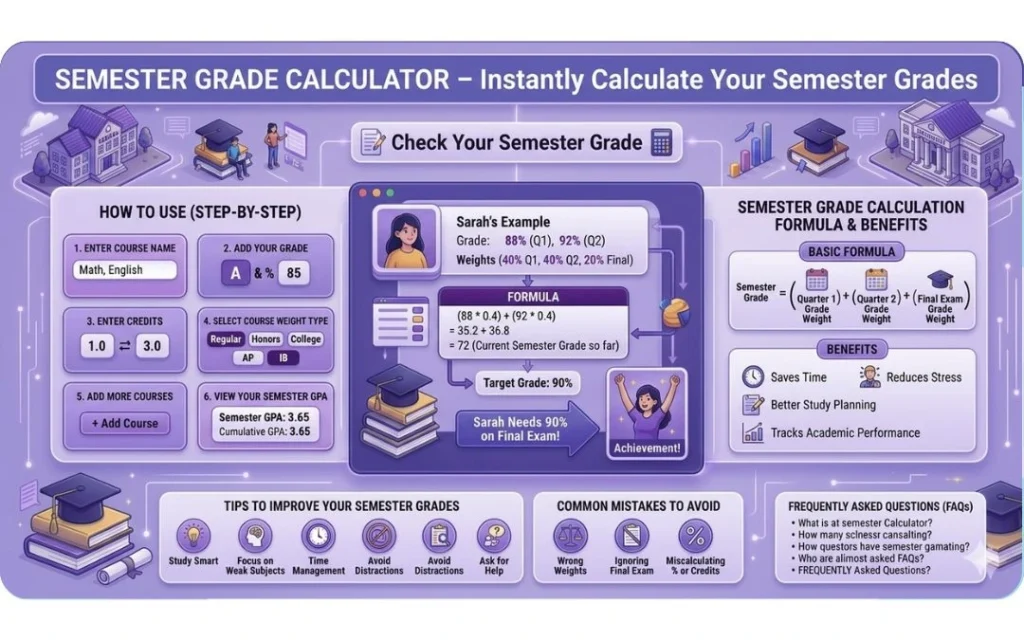
What is a Semester Grade Calculator?
This platform is a simple, user-friendly tool that combines your grades from your different courses to give you your overall semester performance. It’s especially useful for high school students but works just as well for college. You can think of it as a digital version of a cumulative grade calculator or a grade point average calculator, one that sums up all your efforts and shows you exactly where you stand academically
Your grades stay private: everything is calculated in your browser, and nothing you enter is uploaded or stored.
How to Use the Semester Grade Calculator
Using this grade calculator semester tool is super simple. No need to do any complex math or worry about formulas, just enter your details, and it does the rest for you.
Here’s how to use the semester exam grade calculator step by step:
Step 1: Enter Your Course Name
Start by typing in the name of each course or subject you’re taking this semester, like Math, English, or Biology. This keeps everything organized in your semester exam grade calculator.
Step 2: Add Your Grade
Enter your grade for each course. Choose a letter grade (A, B+, etc.) from the dropdown for each course — the tool accepts letter grades only, not percentage marks.
Step 3: Enter Credits
Add the credit value for each course (e.g., 0.5, 1.0, or 3.0). Credits show how important or long each course is, and the calculator uses these to weigh your courses properly, just like a cumulative grade calculator.
Step 4: Select Course Weight Type
Choose the course weight from options like Regular, Honors, College, AP, or IB. This makes your grade calculation more accurate, similar to how a grade point average calculator works.
Step 5: Add More Courses (If Needed)
Have multiple subjects? Click “+ Add Course” and repeat the steps to get your full semester results instantly.
Step 6: View Your Semester GPA
Once you enter all courses, grades, credits, and weights, the calculator instantly shows your Semester GPA and Cumulative GPA, just like a grade to GPA calculator.
Step 7: Add Another Semester (Optional)
Track your progress over multiple semesters by clicking “+ Add Semester.” This turns your tool into a long-term cumulative grade calculator.
Step 8: Reset Anytime
Made a mistake? Just hit Reset to clear everything and start fresh.
Pro Tip: Use this calculator with a final grade calculator or average grade calculator to set goals and plan your study schedule effectively.
How to Calculate Semester Grades Manually
If you want to understand the math behind the tool, here’s a simple way to do it manually using the grade calculator semester approach:
Step 1: List Subjects/Categories
Write down all your courses or grading categories like homework, quizzes, exams.
Step 2: Find the Grade Points
Each letter grade is worth grade points: A = 4.0, B = 3.0, C = 2.0, D = 1.0, F = 0 (with A− 3.7, B+ 3.3, and the other plus/minus steps in between).
Step 3: Multiply by Credits
Multiply each course’s grade points by its credits — for example, an A (4.0) in a 3-credit course is 12.0 grade points.
Step 4: Divide by Total Credits
Add up all the grade points and divide by your total credits to get your Semester GPA.
Semester GPA Calculation Formula
Here’s the basic formula to calculate your semester grade using the calculator:
Semester GPA = (grade points × credits for each course, added together) ÷ total credits. Grade points: A+ 4.0, A 4.0, A− 3.7, B+ 3.3, B 3.0, B− 2.7, C+ 2.3, C 2.0, C− 1.7, D+ 1.3, D 1.0, D− 0.7, F 0.
For individual categories:
For each course, multiply its grade points by its credits, then add the results together.
Many schools build the Semester GPA from grade points and credits: each course contributes its grade points multiplied by its credits, divided by total credits.
Example of Semester Grade Calculation
Let’s see this in action with real student examples:
Example 1: Sarah’s Semester GPA
Sarah took three courses this semester: Math, English, and Biology.
Math — A (3 credits): 4.0 × 3 = 12.0. English — B (3 credits): 3.0 × 3 = 9.0. Biology — A (4 credits): 4.0 × 4 = 16.0.
How Sarah’s GPA Is Calculated
Add the grade points together: 12.0 + 9.0 + 16.0 = 37.0 grade points. Add the credits together: 3 + 3 + 4 = 10 credits.
Semester GPA = 37.0 ÷ 10 credits = 3.70
Sarah’s Semester GPA is 3.70.
Benefits of Using a Semester Grade Calculator
Using an this calculator like this one has many benefits:
- Saves you time by doing all the math for you
- Reduces stress by showing where you stand early
- Helps you plan your study schedule better
- Tracks your academic performance clearly over time
It’s better than guessing and worrying. This is your academic peace of mind!
Many students also check a gpa calculator for semester grades alongside it, to see how this semester will move their overall GPA.
The tool is free with no signup: enter a letter grade and credits for each course, and your Semester GPA and Cumulative GPA appear instantly.
Tips to Improve Your Semester Grades
Here are some simple tips to help you boost your semester grades:
- Study smart, not just hard
- Focus on your weak subjects or topics
- Manage your time efficiently
- Avoid distractions like phones or social media during study
- Don’t hesitate to ask teachers or classmates for help
Small changes can make a big difference!
Regularly checking your scores with a Grade Calculator can help you identify weak areas before final exams.
Common Mistakes Students Make
Watch out for these common errors that can hurt your semester grade calculation:
- Choosing the wrong course weight type (Regular instead of Honors, AP, IB, or College)
- Entering the wrong letter grade for a course
- Miscalculating grade points or credits
Double-check everything for accurate results.
Frequently Asked Questions (FAQs)
Last Thoughts
Don’t wait for results day to find out how you’re doing. Use a semester grade calculator today to take control of your academic journey. It saves time, reduces stress, and helps you plan better. Track your progress, set goals, and study smarter, your future self will thank you for it!