
Average Grade Calculator | Average Grades Multiple Courses
| # | Grade (%) | Weight |
|---|---|---|
| 1 |
Average Grade
The Average Grade Calculator is a powerful online tool, that helps students and teachers calculate average grades using percentage letter grades or GPA (grade points). This tool provides fast, accurate, and reliable results making it easier to track academic performance and avoid manual errors. Whether you’re calculating grades for assignments, exams or overall course performance, this calculator delivers instant results with a simple and user friendly interface.
This average calculator grades every assignment you enter and combines them into one clear overall average.
Your grades stay private: the averages are calculated in your browser, and nothing you type is uploaded or stored.
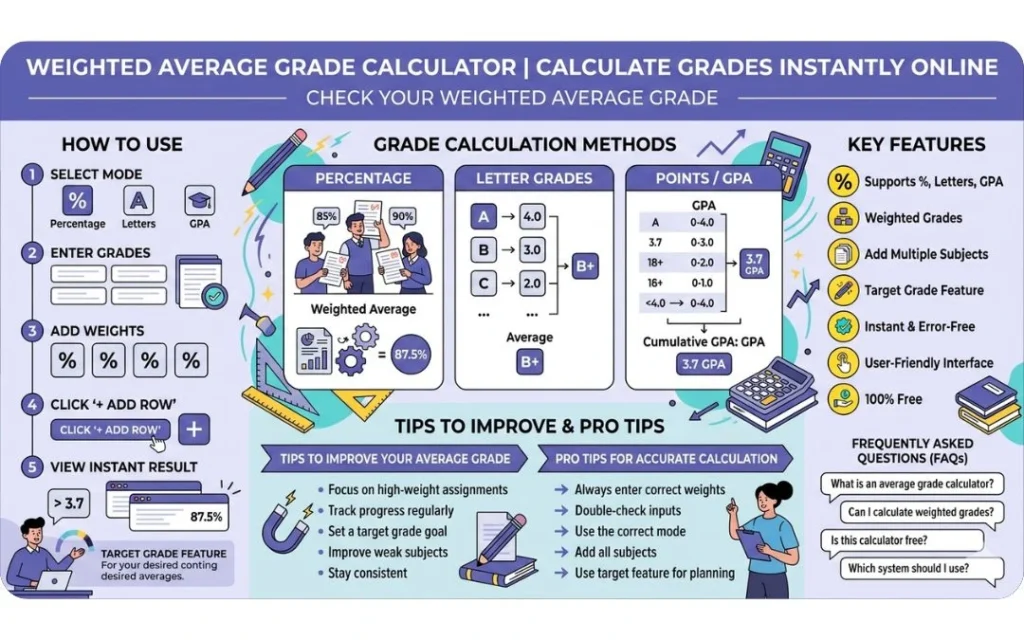
How to Use the Average Grade Calculator
Using this grade calculator is simple and efficient:
- Select your preferred mode: Percentage, Letters, or Points
- Enter your grades in the input fields
- Add weight for each subject or assignment (if needed)
- Click on Add Row to include more grades
- Instantly view your average grade result
If you want to calculate your overall course result, try our Final Grade Calculator .
Grade Calculation Methods
Percentage Grade Calculator
The percentage grade calculator allows you to enter marks in percentage format (e.g., 85%, 90%, etc.) to calculate your average percentage score. This method is widely used in schools and colleges for clear and numerical performance evaluation.
How it works:
- Enter your percentage scores for each subject
- Add weights if required
- The calculator finds the weighted or simple average percentage instantly
Letter Grade Calculator
The letter grade calculator helps convert and calculate grades like A, B, C, D, or F into an overall average. It is useful for systems that follow letter-based grading scales.
How it works:
- Enter your letter grades for each subject
- The tool converts them into grade values internally
- It then calculates your final average letter grade
Points / GPA Calculator
The GPA (Grade Point Average) calculator uses grade points (e.g., 4.0, 3.7, etc.) to calculate your academic performance. This method is commonly used in universities and higher education systems.
How it works:
- Enter grade points for each subject
- Add maximum points or weights if needed
- The calculator computes your overall GPA accurately
For one class with weighted categories, use the main grade calculator instead. To combine two quarters and a final exam into one mark, use the semester grade tool.
Here is a simple example. Sara’s five test scores are 85, 92, 78, 90, and 88. Added together they make 433, and 433 divided by 5 is 86.6, so her average is 86.6 percent, which is a B.
Weighted classes work a little differently. If the midterm counts as much as two regular tests, it is entered twice in the list, so the weighted average leans more toward the midterm score. The tool above handles both methods: simple and weighted.
Which method should you use? If every score counts the same, the simple method is right. If your teacher gives tests more weight than homework, use the weighted method and enter each category with its weight. When in doubt, check the syllabus: it always states how the course is graded.
Key Features
Easily calculate grades with a powerful and flexible online grade calculator designed for accuracy and convenience. These features help you manage multiple subjects, track performance, and get instant results without errors.
- Supports percentage, letter grades, and GPA calculations
- Weighted grade calculation for more accurate results
- Add multiple subjects using dynamic rows
- Target grade feature to plan your desired results
- Instant and error-free calculations
- Simple, clean, and user-friendly interface
- 100% free online grade calculator
Your grading average updates the moment you add a new score, so it is always current.
Tips to Improve Your Average Grade
Improve your academic performance with smart strategies and consistent effort using a reliable grade calculator. Follow these practical tips to boost your scores, stay organized, and achieve your target grades more effectively.
- Focus on high-weight assignments to boost your grade faster
- Track your progress regularly using a grade calculator
- Set a target grade goal and plan your scores
- Improve weak subjects instead of only focusing on strong ones
- Stay consistent with homework and quizzes
Check your average after every test or assignment, not just at the end of the term. Small drops are easy to fix early, and tracking them means the report card holds no surprises.
Pro Tips for Accurate Grade Calculation
Ensure precise and reliable results by using the grade calculator correctly with proper inputs and settings.
These expert tips help you avoid errors, improve accuracy, and plan your grades more effectively.
- Always enter correct weights for each subject
- Double-check your inputs to avoid mistakes
- Use the correct mode (percentage, GPA, or letter grades)
- Add all subjects for a complete average
- Use the target grade feature for planning
Why Use This Average Grade Calculator?
This online average grade calculator helps students and teachers save time while tracking academic performance more efficiently. With support for multiple grading systems, it becomes a complete solution for grade calculation, performance tracking, and result planning.
A grade average calculator like this one does the adding, weighting, and dividing for you, so you never have to average a long list of grades by hand.
Many students check it while thinking, ‘What if my average falls below 80 this month?’ and it gives them the answer in seconds.
An average grade is not the same as a GPA. This page averages one set of scores, while a GPA combines every course you take on a grading scale.
You can also average one subject at a time. Add only your math scores to see your math average, then only your English scores for English. This shows which subject is pulling your overall average down and where extra study time will help most before exams.
Frequently Asked Questions (FAQs)
Final Thoughts
The Average Grade Calculator is a simple yet powerful tool for anyone who wants to calculate grades quickly and accurately. Whether you’re a student tracking your progress or a teacher managing class performance, this tool makes grading easier, faster, and more reliable.